
What This Post Covers:
- You will learn the exact steps to take in the first 10 minutes after a MacBook water spill.
- You will see the common mistakes that turn a small spill into an unfixable, dead logic board.
- You will learn why time and corrosion matter so much for soldered MacBook chips.
- You will see what liquid damage repair looks like in India and realistic cost ranges.
- You will know how to decide between component-level repair and full MacBook replacement.
Water and a MacBook are a catastrophic mix, but a spill does not automatically mean your laptop is dead. What happens in the first ten minutes decides the vast majority of outcomes. Power on a wet MacBook and electrical current can short-circuit the logic board instantly. Shut it down fast, and many MacBooks recover with an ultrasonic chemical clean and component-level repair.
Do not wait around to "see if it dries." If you have just spilled liquid on your laptop, follow the emergency steps below immediately, then consult GoFix laptop repairs to assess the internal circuits.
Spill Damage: Quick Checker
| What Happened | Risk Level | Best Next Step |
|---|---|---|
| A few drops on the keyboard, wiped and dried quickly | Low | Power off immediately, invert laptop, get internal inspection |
| Half a glass poured directly over the keyboard or trackpad | High | Forced power off, unplug, book same-day diagnostic |
| Sugary drink, tea, coffee, or milk spill | Very High | Forced power off, do not charge; acid/sugar causes rapid corrosion |
| MacBook was powered on and shut down by itself during spill | Critical | Do not attempt to power on; board short-circuit has already occurred |
What Should You Do First After Spilling Water on a MacBook?
After spilling water on a MacBook, shut it down immediately by holding down the power button or Touch ID sensor for 5 to 10 seconds. Unplug the MagSafe or USB-C charger and remove all connected dongles, drives, and external monitors. Do not attempt to turn it back on. Every minute power flows through wet circuits escalates the likelihood of galvanic corrosion and permanent copper trace destruction.
- Force shutdown: Hold the power button / Touch ID sensor until the screen goes completely dark, even if macOS still appears responsive.
- Disconnect power: Unplug the charger, USB hubs, mouse, and external drives immediately.
- Wipe surface water: Use an absorbent microfiber towel or lint-free cloth to blot moisture from the keyboard, trackpad, and chassis vents.
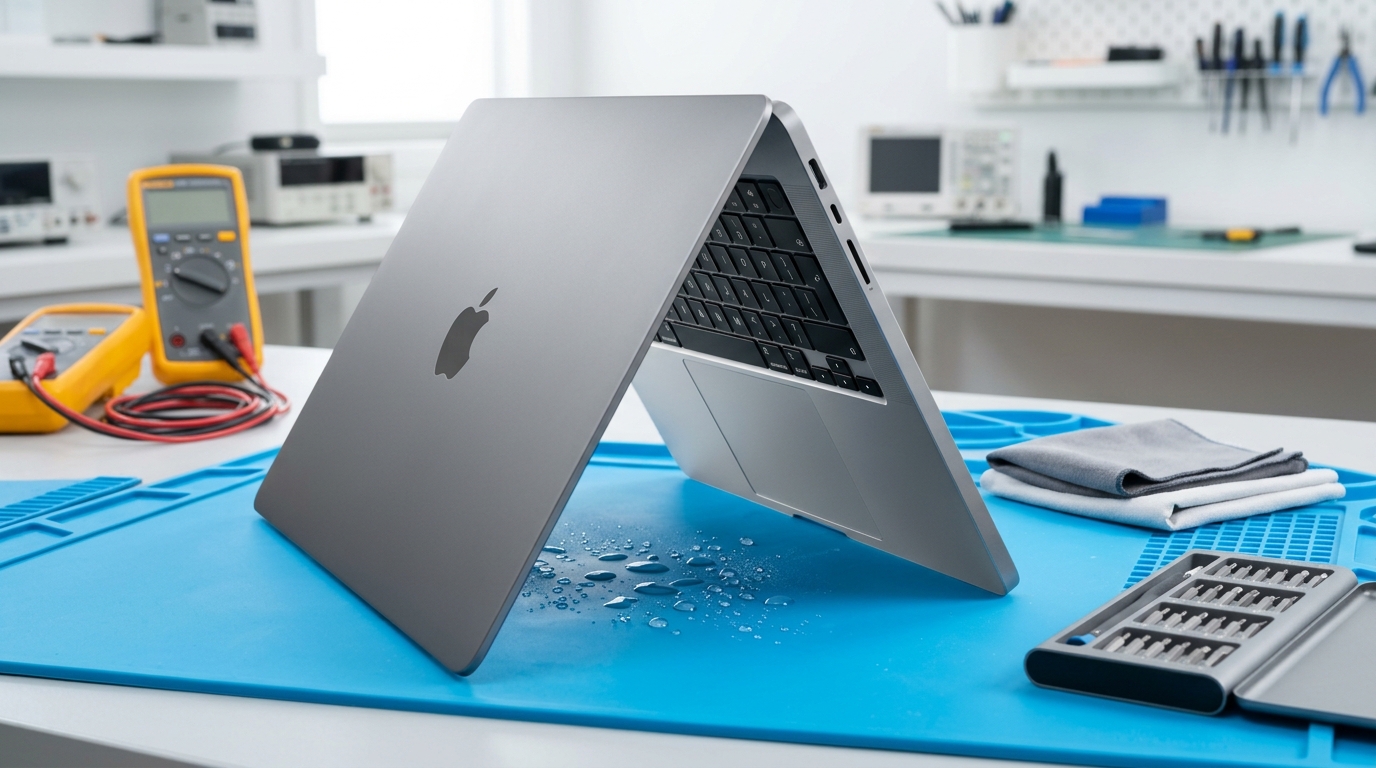
- The Inverted Tent Position: Open the display to 90 degrees and place the MacBook upside down in an inverted "V" tent shape on a dry towel. This gravity-assisted drainage directs water away from the logic board and toward the keyboard membrane.
- Never charge or test: Do not plug in the charger or tap keys to "check if it still works."
- Seek professional cleaning: Book an ultrasonic board diagnostic the same day.
What Should You Never Do After Spilling Water on a MacBook?
Never turn the MacBook on to check if it functions. That single impulsive check causes more irreversible logic board burnouts than the liquid spill itself.
If the MacBook was plugged into mains power when the spill occurred, pull the adapter from the wall socket first before touching the wet laptop cable to protect yourself from electrical shock.
| Do Not | Why It Causes Serious Damage |
|---|---|
| Switch it on to test it | Electrical current flowing through liquid causes instant short circuits and blown power ICs. |
| Use a hair dryer | Forced air pushes liquid droplets deeper under soldered BGA chips; heat warps keycaps and display coatings. |
| Bury it in uncooked rice | Rice cannot extract moisture trapped under metallic shields. Worse, starch dust enters USB-C ports and binds with moisture into abrasive paste. |
| Shake or tap the laptop | Vigorous movement spreads trapped pooling liquid across dry motherboard sections. |
| Plug in the charger | High-amperage charging current flowing into a wet DC-in board destroys power management circuits. |
| Wait a few days to "air dry" | Even after water evaporates, dissolved mineral salts and acids remain, eating away copper traces through progressive corrosion. |
Why Is Spilled Water on a MacBook Worse Than It Looks?
The MacBook logic board contains the CPU, GPU, unified RAM, and SSD storage chips soldered directly onto a single substrate. Liquid reaching the board corrodes solder joints, shorts out 19V backlight power rails into 1.8V CPU lines, and creates resistive oxidation bridges across microscopic capacitors.
Coffee, tea, soft drinks, and alcohol are far more destructive than plain water because they introduce acids, milk fats, and sugars that aggressively pit circuit boards. Furthermore, because flash NAND storage has been soldered onto MacBook logic boards since 2016, a destroyed board often means total personal data loss unless micro-soldering specialists can restore power rails.
Standard Apple warranty terms strictly exclude liquid damage. While AppleCare+ covers accidental damage with tier fees, third-party component-level repair specialists at GoFix can often clean, desoldering, and replace damaged capacitors at a fraction of Apple's flat logic board replacement quote.
What Does Spilled Water on a MacBook Repair Look Like in India?
Repair feasibility depends on how far liquid penetrated and how quickly the device reached a repair bench, rather than the initial volume spilled. A spill addressed within an hour has an over 80% survival rate, whereas a laptop left sitting wet for two days suffers severe copper layer delamination.
| Damage Level | Typical Repair Process | Survival Outlook |
|---|---|---|
| Keyboard or trackpad only | Ultrasonic top-case cleaning and individual trackpad/flex replacement | Excellent |
| Battery and USB-C port ingress | Power daughterboard replacement and battery connector cleaning | Good if addressed quickly |
| Logic board liquid contact | Ultrasonic chemical PCB bath, microscope trace inspection, and micro-soldering IC repair | Strong within 24h; drops rapidly over time |
Costs vary depending on whether your model is an M1/M2/M3 MacBook Air or Pro. Always demand a written diagnostic breakdown and secure data recovery plan before approving repairs.
Should You Repair or Replace a Water-Damaged MacBook?
Repair the MacBook if diagnosis indicates damage is restricted to the keyboard, trackpad, battery, or sub-boards, or if logic board micro-soldering repairs remain under 50% of the replacement cost of an equivalent machine. Replace it only if catastrophic multi-rail corrosion has burned through internal PCB layers or destroyed the SoC processor.
At GoFix laptop repairs, technicians disassemble wet MacBooks immediately, disconnect battery lines, and run specialized PCB ultrasonic cleanings to wash away mineral deposits before testing individual power rails.
The Final Say on Spilled Water on a MacBook
A liquid spill is an emergency that demands immediate action in the first ten minutes. Shut the MacBook down, unplug all cables, invert the machine into a tent shape on a dry towel, and keep it powered off. Skip the rice myth and hair dryers. Bring the laptop to GoFix for professional ultrasonic cleaning before permanent corrosion takes hold.
Frequently Asked Questions
Q: What should I do immediately after spilling water on my MacBook?
A: Hold down the power button / Touch ID sensor for 5 to 10 seconds to force shutdown. Unplug the charger and all accessories immediately. Wipe exterior moisture and prop the MacBook upside down in a tent position on a towel. Do not try to turn it back on.
Q: Will placing my wet MacBook in rice dry it out?
A: No. Rice does not pull moisture from sealed internal circuits, and starch dust can clog USB-C ports and fan assemblies. Professional ultrasonic board cleaning is the only proven method to remove moisture and mineral residue.
Q: Can a MacBook survive a liquid spill?
A: Yes, frequently—provided the laptop is powered down immediately and brought to a repair centre before galvanic corrosion destroys motherboard traces. Speed is the single most decisive factor in saving a wet laptop.
Q: How long should I wait before turning on a wet MacBook?
A: Do not turn it on at all until a technician opens the chassis, confirms complete internal dryness, and checks for corroded power rails. Even after the outer shell feels dry, liquid can remain trapped under soldered chips for days.
Q: Does Apple warranty cover liquid damage on a MacBook?
A: Apple standard one-year warranty does not cover liquid damage. AppleCare+ provides accidental damage coverage for a tiered deductible. GoFix provides transparent diagnostics and component-level logic board repairs to restore wet MacBooks without replacing the entire board.